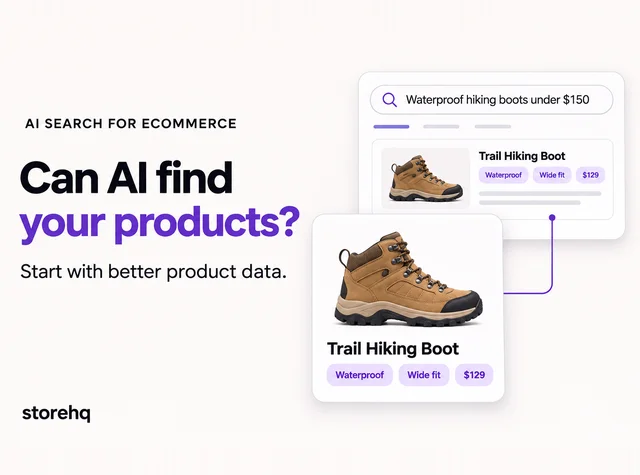
Your products may fit a shopper’s request perfectly. Can an AI shopping tool tell that?
A hiking boot might be waterproof, available in wide sizes, and priced below $150. But if those details are missing from your product data, the match becomes harder to make.
As AI search becomes another way to discover products, Shopify brands need to think about how clearly their catalogs communicate what they sell. A connected feed helps, but the information inside it matters just as much.
In this blog, we will look at how AI search for ecommerce works, what Shopify already provides, and how to improve product feeds so your products are easier to understand and compare.
How Does AI Search Change Product Discovery?
AI search changes how shoppers look for products because they can describe exactly what they want in natural language.
Instead of searching for something broad like “hiking boot,” a shopper might ask for a “waterproof hiking boot with a wide fit under $150.” That gives AI more context around budget, features, fit, and intended use.
For your store, this means detailed product information matters more. The clearer your product pages are about materials, sizing, features, use cases, and other important attributes, the easier it is for AI platforms to understand when a product may be relevant.
There is no fixed format for every AI shopping result. The goal is simply to give these platforms enough accurate information to compare your products against the kinds of questions shoppers are actually asking.
What Is a Product Feed, and Why Does It Matter?
A product feed is a structured set of information about what you sell. It can include product titles, descriptions, images, prices, availability, identifiers and variant details.
Think of it as a cleaner way to give platforms the product information they need to understand your catalog alongside what they can already find on your website.
A strong feed should answer the basics clearly:
- What is the product?
- Which version is available?
- What does it cost?
- And where can someone buy it?
Better product data can improve how accurately your products are understood and surfaced. It does not guarantee that an AI platform will recommend a specific product for a specific search.
How Do ChatGPT and Google Access Product Information?
The platforms use different systems. Before building another feed, check which connections your store already has.
ChatGPT shopping
ChatGPT considers the shopper’s request alongside product metadata and other information, including third-party content. Its product results are selected independently and are separate from ads.
OpenAI says Shopify catalogs are already integrated into ChatGPT, so individual Shopify merchants do not need an additional application simply to connect their catalogs. Other merchants can explore approved direct-feed access through OpenAI’s merchant program.
For Shopify brands, the practical starting point is checking the accuracy and completeness of the catalog already being shared.
Google’s AI search experiences
Google recommends keeping Merchant Center information current and ensuring that structured data matches the visible product page. Its guidance also emphasizes accessible pages and useful content.
A Merchant Center feed and product-page markup complement each other. Neither guarantees inclusion in AI Overviews or AI Mode.
The wider relationship between catalog quality, content, and trust is covered in how to make products discoverable in AI answers.
What Should You Improve in Your Product Feed?
Start with information that focuses on details that help shoppers choose.
Make titles and descriptions specific
“Trail Hiking Boot, Waterproof, Men’s Wide Fit” says more than “Trail Boot.” Describe materials, fit, intended use, and limitations clearly. Answer buying questions without repeating keywords.
Complete identifiers and variant details
Follow Google’s product data specification as a reference for the attributes relevant to your products:
- Brand and assigned GTINs or part numbers.
- Size, color, and material.
- Product category and type.
- Correct variant grouping and purchase links.
Never invent identifiers. Missing attributes can make matching less precise.
Use images that show the right item
Match each image to the advertised product and variant. Check that its link leads to the correct product page.
How Do You Keep Prices and Availability Consistent?
Your product feed, product page, and checkout should show the same price and availability. If a jacket costs $49 in your feed but $59 on your website, the mismatch can confuse shoppers and cause listing issues.
Update your feed based on how quickly prices and inventory change. Frequent promotions or fast-selling products need more regular updates. Check for failed syncs too, as a scheduled update may not always go through.
Keep shipping costs, delivery estimates, and return details accurate wherever supported. These help shoppers understand the full cost and what to expect when ordering.
What Else Supports AI Product Discoverability?
Structured data helps search engines understand product details such as price, availability, and variants. Check what your Shopify theme and apps already generate before adding more, as conflicting markup can cause errors. Use Google’s Rich Results Test to check supported markup.
Genuine reviews add context about fit, performance, and everyday use. Keep them easy to find alongside buying guides, shipping details, and return policies. No review count guarantees AI visibility.
StoreHQ’s GEO approach considers these broader signals alongside catalog quality to support AI discoverability.
How Can You Track AI Search Visibility?
Build a small set of questions based on what customers ask before buying. Include category, budget, fit, and use-case questions.
Repeat those checks under similar conditions. Record whether your products appear, whether the details are correct, and which alternatives are shown. Treat the results as observations: responses can vary with context and timing.
In GA4, review identifiable referrals from AI platforms, then compare engaged visits, purchases, and revenue. Referral reports will not capture every AI-influenced purchase. Use Search Console for Google performance and any AI-specific insights available to your property. Review Merchant Center issues separately to identify catalog problems that need fixing.
Frequently Asked Questions
Does a complete product feed guarantee AI recommendations?
No. It helps platforms understand your products, but recommendations also depend on relevance, available information, and the platform’s systems.
Do Shopify merchants need a separate feed for ChatGPT?
OpenAI says Shopify catalogs are already integrated. Check your existing catalog before pursuing an additional connection.
How often should you update a product feed?
Update it frequently enough to reflect price and stock changes. Follow your integration’s requirements and check that updates succeed.
Does feed optimization replace ecommerce SEO?
No. Feeds organize catalog information, while SEO also supports accessible pages, helpful content, internal links, and the wider website experience.
Make Your Catalog Easier to Understand and Choose
A useful product feed makes the details behind a buying decision clear: what the product is, who it suits, which options are available, and what the purchase involves.
Start with your most important products. Check their titles, attributes, images, prices, and stock against the storefront, then expand the improvements across your catalog.
For help identifying the most useful next steps, start a conversation with StoreHQ about the gaps affecting your store’s AI discoverability.

 8 min read